 Onetrail
Create and update items
There are different ways to create Business Central items from Onetrail Items.
To set up item templates
Before we create Business Central items from the Onetrail Items, we need to set up item templates.
You can set a template per Onetrail UNSPSC Classifications.
- Choose the
 icon, enter Onetrail UNSPSC Classifications, and then choose the related link.
 - In the Item Template Code field, select the item template you want to use when an item is created for this classification.
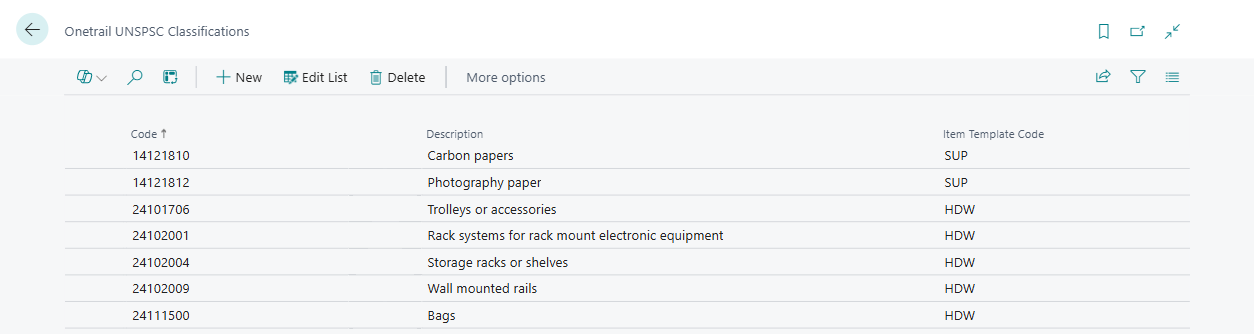
If no item template is set for the classification, the default template is used. For more information, see Set up XPR365 Onetrail.
To create and update items
There are different ways to create Business Central items from Onetrail Items.
- Create/Update the item manually.
- Create/Update items automatically by using a job queue entry.
- The item will be created automatically when using it in a sales quote/order.
Note
To create an item, the vendor must exist. The vendor mapping is based on the GLN.
Create/update items manually
- Choose the icon, enter Onetrail Items, and then choose the related link.
- Choose the Process (Create & Update) action to create or update the selected Onetrail items.
- Choose the Process (Update Only) action to update the selected Onetrail items. If the selected item does not exist, nothing happens.
Create/update items automatically
Schedule the task to create and update items to run for example every night via a job queue entry.
Once the item is created, it will disappear from the Onetrail Items list. When a new Onetrail file is imported with a change for that item, it will be added back to the Onetrail Items list.
| Task | Object |
|---|---|
| Create and update items | Codeunit 71145594 - SCA.ONE.CreateAndUpdateItems |
Note
It is not recommended to let Onetrail items be created automatically via a job queue entry because it is often not desirable to create all Onetrail items as items in Business Central.
Create/update items automatically in a sales quote/order
If the item does not yet exist in Business Central, the Onetrail item can be selected by executing the Select Onetrail Items action in the Lines of a sales quote/order. When this item is placed on the sales quote or sales order, this Onetrail item will be created as an item in Business Central. When there are multiple vendors, the other vendors are also included when creating the item.